Summarize linked values with a rollup
Updated:
On this page
Use a rollup to display values from linked records or summarize them with calculations such as a sum or average.
Add a rollup field
Rollups use values from records linked through a relation. Create a relation field in the collection where you want the rollup, then link the records you want to summarize. If you haven’t created a relation, follow Link records with a relation first. To total amounts, add a number field in the linked collection and enter the amounts.
- Touch and hold the collection where you want the rollup in the collection list and open Edit Collection.
- Tap Add Field.
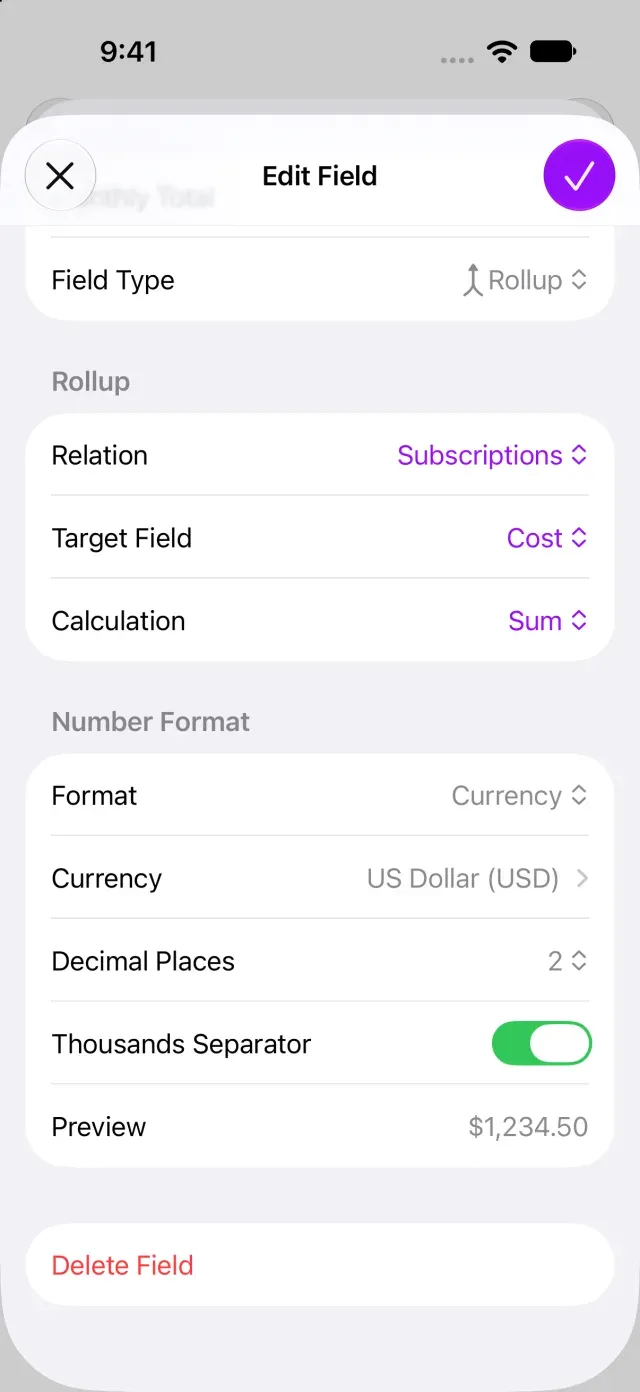
- Choose Rollup under Field Type and enter a Field Name.
- Under Relation, choose the relation to use.
- Under Target Field, choose the field to summarize from the linked records.
- Choose a summary method under Calculation. To add amounts, choose Sum.
- Tap Done. The rollup result appears in the record’s details.
Changes to linked values are reflected in the summary. You can’t enter a rollup result directly.
Choose a summary method
Available calculations depend on the target field’s type. For numbers, you can choose a sum or average; for dates, the earliest or latest date; and for checkboxes, the number of checked values. You can also display a list of linked values. If Sum isn’t available, make sure the target field is a number field.
If you purchased Clastly Pro but can’t set up the field, see Clastly Pro features aren’t available after purchase.
Was this article helpful?
Choose a reason
Thank you for your feedback.
If you still need help, use the contact form.